Phone
Calls
In CrewBrix
AI field service software for contractors
CrewBrix keeps your calls, customers, jobs, schedules, invoices, and payments in one app. Brix helps answer and follow up, using the customer and job details you let it see.
Set up voice and booking first. Requests outside your rules wait for approval in Decisions.
Built in Mesa, Arizona · Onboarding Phoenix East Valley contractors

Customers & calls
Jobs & crews
Schedules & visits
Invoices & payments
Brix handling the work
Explore five examples from the CrewBrix app with sample data. See the details behind a decision, a customer reply, a crew plan, or a job cost.
Available actions depend on your plan, permissions, and setup. You choose which actions need approval.
01 / The operating view
The signal
Home brings money, missing costs, recommendations, and active work together.
The work
Brix surfaces the next operational issue without making the owner hunt through screens.
The handoff
The business can move from recommendation to review without losing context.
What you can review
Money, recommendations, and attention in one view
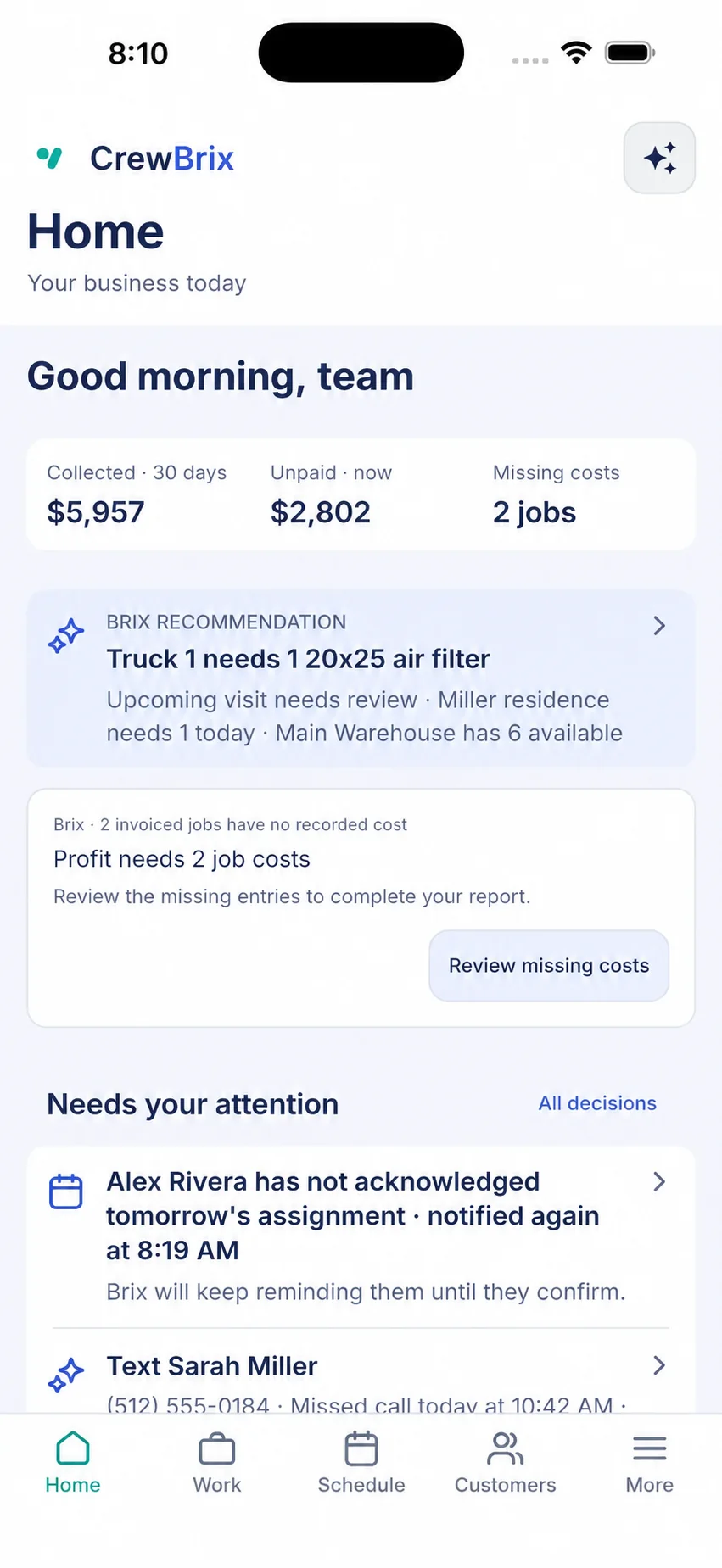
Example / 01 of 05
Use sample data or ask us to show your workflow. Review billing terms when starting a trial.
Calls, messages, and new requests
Calls, forms, supported social messages, and Connect requests can start work in CrewBrix.
New customer leads
Know what brings you work
Inbound record
Phone
Calls
In CrewBrix
Website· Forms
In CrewBrix
Facebook· Messages
In CrewBrix
Instagram· Messages
In CrewBrix
Google· Discovery
Source tracked
TikTok· Discovery
Source tracked
Connect· Requests
In CrewBrix
CrewBrix can capture phone calls, website forms, supported Facebook and Instagram messages, and Connect requests. It can also remember when a customer found you on Google or TikTok.
For homeowners
Tell Alex what broke and review the company details available for your ZIP. You choose who to contact. Some services and ZIP codes may not have a match yet.
Explore CrewBrix ConnectFor service companies
Where direct booking is available, each request goes to one qualified company. The details arrive in CrewBrix for your team to follow up.
See the business sideNo. CrewBrix also manages customers, jobs, schedules, crews, estimates, invoices, payments, and follow-up in one app.
Brix uses the customers, jobs, schedules, and rules you let it see. Review proposed actions in Decisions and follow their status in Activity. Ask us to demonstrate your approval rules in a demo.
Alex helps a homeowner explain what is wrong and find the next step. Brix helps a service company with supported calls, requests, and follow-up in CrewBrix.
Essential storage stays on to remember this choice. Google Analytics loads only if you allow it. Advertising storage stays off. You can change your choice in Cookie settings.